
The Problem
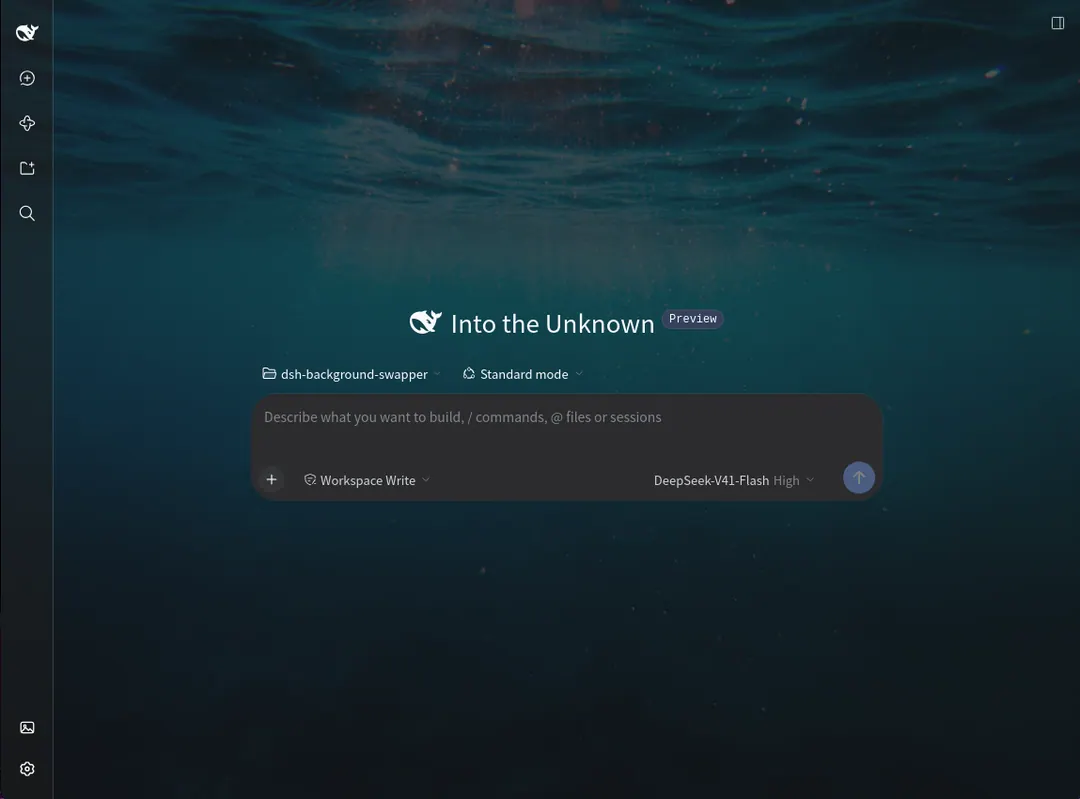
I sit in the DeepSeek Harness most of the day, and it looks the same on every screen I open it on. People put a photo on a second monitor and a plant on the desk next to it. The software keeps its grey.
The tools that existed for this were awkward. You wrote CSS into the app and restarted it, or pasted an image URL over the interface and lost it at the next reload. Most of them were written in languages I cannot read, so I was installing something I could not check first. A photo also fought the writing on top of it. Bright enough to see and the text is hard to read; quiet enough to read and the photo may as well not be there.
The Approach
Background Swapper adds Swap Background just above Settings in the sidebar. Click it, drop a photo on the panel, give it a name, and it is your background straight away. Every saved photo sits in Recent, newest first, six to a page, and clicking a thumbnail switches to it. A pencil renames an entry, a bin deletes it.
Nothing here has a Save button. The sliders apply as you drag and the settings are written a moment after you let go, so the panel is the preview.
One photo, three opacities
The reason a background photo usually fails is that a single opacity slider has to serve the whole interface. Turn it down far enough to see the photo and the menus go with it; leave it up for legibility and the photo disappears behind everything.
The plugin fades three layers instead. Background opacity is the page the whole app sits on, so lowering it fills the open space around your work with photo without touching the controls. Element opacity is the cards, inputs, code blocks and menus raised over that page. Sidebar opacity is the left column on its own, since it is the largest piece of chrome and the one most often tuned separately. Each surface keeps a floor, so a dialog cannot be faded into something you cannot read. Tint runs from Darken 100% to Lighten 100% for a photo that is brighter than the text over it, and Blur softens the photo up to 24 pixels.
Presets, and keeping your own
Three presets set the three opacities at once. Wallpaper is the balance a new install starts on, with the photo filling the page while the panels stay solid. Glass takes the panels down towards frosted and lets the photo cover more. Solid keeps the photo selected and hides it behind a stock interface, which is not the same as removing it.
Presets deliberately leave Tint and Blur alone. Trying one cannot undo a photo you already tuned. When you land on a balance of your own, Save current keeps the three opacities under a name you choose, and it sits in the preset row beside the shipped ones with a small cross to remove it. Six is the most that are kept; past that the button steps aside and the panel says how to make room, rather than greying out a control that cannot explain itself.
No Save button, and nowhere to lose your library
The sliders write a moment after you let go. Reset beside each one returns it to the shipped value, which is the balance Wallpaper sets.
Your photos live with the Harness, not inside the plugin, in a background-swapper folder next to the rest of your Harness data. That is what makes the same library and the same look turn up in every browser you point at it and in the desktop app. It also makes a backup a folder copy and a fresh start a folder delete. The plugin rebuilds what it needs the next time it loads.
Leaving the interface alone
The photo is painted on a fixed pseudo-element behind everything, so the application’s own elements are untouched. The see-through effect redefines the theme’s background variables with color-mix() of the palette tones they already pointed at, split into the three groups the sliders drive. No application class name is targeted, so renaming one breaks nothing, and light and dark switching needs no JavaScript.
The panel is React-rendered and writes nothing by hand into the page body, so unloading the plugin restores the interface exactly. Uploads are validated and looked up by an id in the index, which means a request can never name a path on disk. The host half enforces the 16 MB limit on an upload, the browser half scales anything past 2560 pixels on a side before it is sent, and the panel says when that happened. Animated GIFs keep animating through all of it. SVG files are refused.
Three files and no build step
The install is the repository address pasted into the Harness Plugins dialog, followed by a page refresh. There is nothing to compile: index.js runs in the Harness and carries the routes and the configuration, store.js owns the index and the image folder on disk, and client.js is the browser painter and the panel. A manifest supplies the loader row and its defaults.
Two harnesses cover the two halves and need no browser. The host harness mounts the routes on a bare node:http server and drives the whole surface over real HTTP. The browser harness loads the bundle against a stub module loader and checks the registrations, the exact CSS the painter emits, and the panel’s preset row. Both run in under a second, which is the entire gate on a change. The plugin imports nothing it is not given, Node built-ins on the host side and React on the browser side, and that is what lets it load on a released Harness with no build step.
Key Results
- Background Swapper at 0.2.0, MIT licensed and installable from its repository address with no build step
- Three presets, five sliders and up to six saved looks, with the shipped balance on a fresh install and a Reset beside every slider
- One plugin, and the same photo library in every browser pointed at the Harness and in the desktop app
- Photos stored beside the Harness data rather than inside the plugin, so a backup is a folder copy
- Two test harnesses, a host half over real HTTP and a browser half against a stub loader